Compatible with Chrome and Edge
Instruction Guide
We have a simple tutorial guide which explains the features of the software extension and what each button inside the extension does. Read our tutorial and welcome guide on how to use the extension to the fullest. Use all the features of this browser software.
If you are interested in other web extensions to install, you might wish to check out the Microsoft Bing Search with Rewards extension.
Microsoft Bing Search with Rewards Extension
It allows you to complete daily offers to get points.
Track the number of points you have currently and the rewards you can redeem with these points.
The ways to get points & get rewarded is search with Bing, browse with Microsoft Edge and shop at the Microsoft and Windows stores to earn rewards.
Other useful extensions
Another extension which would be useful to install is the iCloud bookmarks extension.
It allows to keep your Chrome bookmarks on Windows synced up with the Safari bookmarks on your iPhone, iPad, and Mac.
iCloud will store your website bookmarks so it is accessible even on your iPhone and Mac.
Try these other two extensions and see if it will boost your daily productivity.
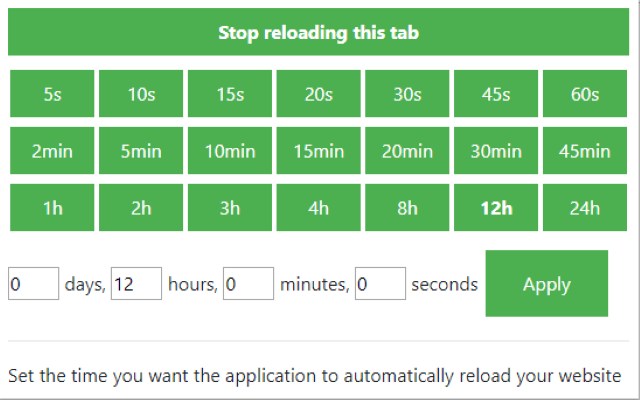
The easiest way to automatically reload and refresh webpages at custom intervals with just one click. You can set a custom time period for each tab, enter the time manually at your disposal. Tab reloading can be disabled or enabled via the toolbar control panel.
Features:
Install and open.
- After installing the extension. You click on the extension icon and can start setting a custom time for when a tab should be reloaded.
In the past few years, the Internet has become a crucial part of people's lives. We use it to work, to shop, and to play. But one thing that hasn't changed is how we use it. We still rely on the same browser tabs that have been around for decades.
The problem with this is that we're wasting time by manually reloading tabs when we want to check something quickly or keep up with our favorite websites. With Tab Reloader, you can automatically reload your browser tabs in just one click so you never have to waste time again!
The most important benefit of reloading tabs automatically is that it saves you time. You'll never have to open a new tab and search for the page you want to view again. Instead, the extension will open it for you instantly.
Another benefit is that it helps save battery life on your phone or tablet. When you're browsing on mobile devices, every tap, swipe and click drains the battery more quickly than when you're using a desktop computer. The more tabs you have open at once, the more power it takes to keep them all running smoothly and loading content as fast as possible.
The reloading tabs extension can help reduce the amount of energy needed for each tab by reloading them automatically when they are opened by a user so there isn't any extra work required from them to keep the page updated with new content when they load their browser window again.
Tutorial:
- Install the Extension
- After installing the extension, click on the icon on the toolbar.